Home • Terms & Conditions
From the 7th April 2026 the Royal Mail are updating postage rates that will affect your franking machine. The good news for franking machine customers is that you still receive massive discounts using a Mailmark franking machine versus stamps or smartstamp. Download our 2026 Wall Chart here
The new rates will be available to download from the 16th March 2026. The new tariffs will be held in the memory and will activate automatically on the 7th April 2026. The terms and conditions of the Royal Mail Franking Scheme require that you keep postal rates up to date on your machine so it is essential that you download the updated rates as soon as possible for your Mailstart & Mailstart+ franking machine. This update is easily performed by connecting to the data centre and selecting ‘Check for Updates’ via the machines menu system.
Download the Mailstart & Mailstart+ Rate Change Instructions here
Order Low Priced Ink, Labels & Accessorises for your Mailcoms Mailstart & Mailstart+ franking machine.Learn how to update your Mailstart & Mailstart+ franking machines postage rates by watching the video below or by following the simple instructions:
• Check that your system is connected as for a normal postage refill
• At the main screen (Date on display) press the ‘Funds’ key.
• Use the review ‘down’ key to scroll to ‘Check balance available?’
• Press the ‘Yes/Enter’ key.
• The machine will automatically connect to the PB Infrastructure.
• Once the meter has connected it will show ‘Checking PBP Account Balances’.
• The machine then shows ‘Prepaid £xx.xx’ (the balance of your PBP account).
• Press the ‘Yes/Enter’ key to continue.
• The meter then asks if you wish to Refill Postage. Press the ‘No’ key to continue.
• The meter will check for updates and display ‘SYSTEM UPDATE REQUIRED – Please Wait’.
• Press the ‘Yes/Enter’ key to download and install the new rates.
• Once completed the display will read ‘Download complete Continue – press enter’
• Press the ‘Yes/Enter’ key.
• The display will then show ‘During the call: Rate data installed’
• Press the ‘Yes/Enter’ key.
• You will be asked ‘Do you want to print a download report?’
• Press the ‘No’ key.
• The machine will then return to the main screen. The new rates are now installed.
Please note: Due to the amount of updates being performed during this period you may need to repeat the above or try outside of busy / peak times.
Please note: If you advance the printing date to 7th April 2026 or beyond, this will activate the new Postal Rates and cannot be reversed.
From the 7th April 2026 the Royal Mail are updating postage rates that will affect your franking machine. The good news for franking machine customers is that you still receive massive discounts using a franking machine versus stamps or smartstamp. Download our 2026 Wall Chart here
The new rates will be available to download from the 16th March 2026. The new tariffs will be held in the memory and will activate automatically on the 7th April 2026. The terms and conditions of the Royal Mail Franking Scheme require that you keep postal rates up to date on your machine so it is essential that you download the updated rates as soon as possible. This update is easily performed by connecting to the data centre and selecting ‘Check for Updates’ via the machines menu system.
Download the Mailmark Mailbase Series Rate Change Instructions here
Order Low Priced Ink, Labels & Accessorises for your Mailcoms Mailbase franking machine.Learn how to update your Mailbase franking machines postage rates by watching the video below or by following the simple instructions:
• Check that your system is connected as for a normal postage refill.
• With your machine on the Home screen press the ‘Add Postage’ key.
• Select ‘Check PbP Balance.’
• The machine will automatically connect.
• When connection has been made, the ‘Add Postage’ screen appears.
• Press ‘No’ to skip adding funds.
• Your machine will automatically check and begin downloading new rate files.
• When the update has finished downloading follow the prompts until you return to the Home screen.
• You may receive a request to reconnect for a further upload/download. Proceed by re-connecting and follow any prompts.
Please note: Due to the amount of updates being performed during this period you may need to repeat the above or try outside of busy / peak times.
Please note: If you advance the printing date to 7th April 2026 or beyond, this will activate the new Postal Rates and cannot be reversed.
From the 7th April 2026 the Royal Mail are updating postage rates that will affect your franking machine. The good news for franking machine customers is that you still receive massive discounts using a franking machine versus stamps or smartstamp. Download our 2026 Wall Chart here
The new rates will be available to download from the 16th March 2026. The new tariffs will be held in the memory and will activate automatically on the 7th April 2026. The terms and conditions of the Royal Mail Franking Scheme require that you keep postal rates up to date on your machine so it is essential that you download the updated rates as soon as possible for your Mailbase+ franking machine. This update is easily performed by connecting to the data centre and selecting ‘Check for Updates’ via the machines menu system.
Download the Mailmark Mailbase+ Rate Change Instructions here
Order Low Priced Ink, Labels & Accessorises for your Mailcoms Mailbase+ franking machine.
Learn how to update your Mailbase+ franking machines postage rates by watching the video below or by following the simple instructions:
• Check that your system is connected as for a normal postage refill. This can be via LAN connection or PC Meter Connect.
• At the main screen press the ‘Refill Postage’ key.
• Select ‘Check PbP Balance.’
• Select ‘Continue.’
• Press the Enter key if prompted.
• The machine will automatically download and install rates. A series of status messages will be displayed.
• When the update has finished, follow the prompts (if any), until you return to the main screen. Do not switch off until the process is finished.
• You may receive a request to reconnect for a further upload/download, proceed by reconnecting and follow any prompts.
Please note: Due to the amount of updates being performed during this period you may need to repeat the above or try outside of busy / peak times.
Please Note: If you advance the printing date to 7th April 2026 or beyond, this will activate the new Postal Rates and cannot be reversed.
From the 7th April 2026 the Royal Mail are updating postage rates that will affect your franking machine. The good news for franking machine customers is that you still receive massive discounts using a franking machine versus stamps or smartstamp. Download our 2026 Wall Chart here
The new rates will be available to download from the 16th March 2026. The new tariffs will be held in the memory and will activate 7th April 2026. The terms and conditions of the Royal Mail Franking Scheme require that you keep postal rates up to date on your machine so it is essential that you download the updated rates as soon as possible for your Mailbase Speed franking machine. This update is easily performed by connecting to the data centre and selecting ‘Check for Updates’ via the machines menu system.
Download the Mailmark Mailbase Speed Rate Change Instructions here
Order Low Priced Ink, Labels & Accessorises for your Mailcoms Mailbase Speed franking machine.Learn how to update your Mailbase Speed franking machines postage rates by watching the video below or by following the simple instructions:
• Check that your system is connected as for a normal postage refill. This can be via LAN connection or PC Meter Connect.
• At the main screen press the ‘Refill Postage’ key.
• Select ‘Check PbP Balance.’
• Select ‘Continue.’
• Press the Enter key if prompted.
• The machine will automatically download and install rates. A series of status messages will be displayed.
• When the update has finished, follow the prompts (if any), until you return to the main screen. Do not switch off until the process is finished.
• You may receive a request to reconnect for a further upload/download, proceed by reconnecting and follow any prompts.
Please note: Due to the amount of updates being performed during this period you may need to repeat the above or try outside of busy / peak times.
Please Note: If you advance the printing date to 7th April 2026 or beyond, this will activate the new Postal Rates and cannot be reversed.
From the 7th April 2026 the Royal Mail are updating postage rates that will affect your franking machine. The good news for franking machine customers is that you still receive massive discounts using a franking machine versus stamps or smartstamp. Download our 2026 Wall Chart here
The new rates will be available to download effective from the 23rd March 2026. The new tariffs will be held in the memory and will activate automatically on the 7th April 2026. The terms and conditions of the Royal Mail Franking Scheme require that you keep postal rates up to date on your machine so it is essential that you download the updated rates as soon as possible for your Mailsend Lite franking machine. This update is easily performed by connecting to the data centre and selecting ‘Check for Updates’ via the machines menu system.
Order Low Priced Ink, Labels & Accessorises for your Mailcoms Mailsend Lite franking machine.
Your device updates postal rates and software automatically.
Keep your device turned on and connected to your network to get your automatic updates, as updates are downloaded during the evening hours.
From the 7th April 2026 the Royal Mail are updating postage rates that will affect your franking machine. The good news for franking machine customers is that you still receive massive discounts using a franking machine versus stamps or smartstamp. Download our 2026 Wall Chart here
The new rates will be available to download effective from the 16th March 2026. The new tariffs will be held in the memory and will activate automatically on the 7th April 2026. The terms and conditions of the Royal Mail Franking Scheme require that you keep postal rates up to date on your machine so it is essential that you download the updated rates as soon as possible for your Mailsend Lite & Parcelsend Lite franking machine. This update is easily performed by connecting to the data centre and selecting ‘Check for Updates’ via the machines menu system.
Download the Mailsend Lite & Parcelsend Lite Rate Change Instructions here
Learn how to update your Mailsend Lite & Parcelsend Lite franking machines postage rates by watching the video below or by following the simple instructions:
• Check that your system is connected as for a normal postage refill
• At the main screen (Date on display) press the ‘Funds’ key.
• Use the review ‘down’ key to scroll to ‘Check balance available?’
• Press the ‘Yes/Enter’ key.
• The machine will automatically connect to the PB Infrastructure.
• Once the meter has connected it will show ‘Checking PBP Account Balances’.
• The machine then shows ‘Prepaid £xx.xx’ (the balance of your PBP account).
• Press the ‘Yes/Enter’ key to continue.
• The meter then asks if you wish to Refill Postage. Press the ‘No’ key to continue.
• The meter will check for updates and display ‘SYSTEM UPDATE REQUIRED – Please Wait’.
• Press the ‘Yes/Enter’ key to download and install the new rates.
• Once completed the display will read ‘Download complete Continue – press enter’
• Press the ‘Yes/Enter’ key.
• The display will then show ‘During the call: Rate data installed’
• Press the ‘Yes/Enter’ key.
• You will be asked ‘Do you want to print a download report?’
• Press the ‘No’ key.
• The machine will then return to the main screen. The new rates are now installed.
Please note: Due to the amount of updates being performed during this period you may need to repeat the above or try outside of busy / peak times.
Please note: If you advance the printing date to 7th April 2026 or beyond, this will activate the new Postal Rates and cannot be reversed.
From the 7th April 2026 the Royal Mail are updating postage rates that will affect your franking machine. The good news for franking machine customers is that you still receive massive discounts using a franking machine versus stamps or smartstamp. Download our 2026 Wall Chart here
The new rates will be available to download effective from the 16th March 2026. The new tariffs will be held in the memory and will activate automatically on the 7th April 2026. The terms and conditions of the Royal Mail Franking Scheme require that you keep postal rates up to date on your machine so it is essential that you download the updated rates as soon as possible for your Mailsend Prime & Mailsend Essential franking machine. This update is easily performed by connecting to the data centre and selecting ‘Check for Updates’ via the machines menu system.
Your device updates postal rates and software automatically.
Keep your device turned on and connected to your network to get your automatic updates, as updates are downloaded during the evening hours.
Learn how to update your Mailsend Prime & Mailsend Essential franking machines postage rates by watching the video below or by following the simple instructions:
1. Tap Rates and Updates on the bottom of the Home screen.
2. If new rates are available your device downloads and installs updates.
From the 7th April 2026 the Royal Mail are updating postage rates that will affect your franking machine. The good news for franking machine customers is that you still receive massive discounts using a franking machine versus stamps or smartstamp. Download our 2026 Wall Chart here
The new rates will be available to download from the 16th March 2026. The new tariffs will be held in the memory and will activate automatically on the 7th April 2026. The terms and conditions of the Royal Mail Franking Scheme require that you keep postal rates up to date on your machine so it is essential that you download the updated rates as soon as possible for your Parcelsend Essential franking machine. This update is easily performed by connecting to the data centre and selecting ‘Check for Updates’ via the machines menu system.
Order Low Priced Ink, Labels & Accessorises for your Mailcoms Parcelsend Essential franking machine.Your device updates postal rates and software automatically.
Keep your device turned on and connected to your network to get your automatic updates, as updates are downloaded during the evening hours.
Learn how to update your Parcelsend Essential franking machines postage rates by watching the video below or by following the simple instructions:
1. Tap Rates and Updates on the bottom of the Home screen.
2. If new rates are available your device downloads and installs updates.
From the 7th April 2026 the Royal Mail are updating postage rates that will affect your franking machine. The good news for franking machine customers is that you still receive massive discounts using a franking machine versus stamps or smartstamp. Download our 2026 Wall Chart here
The new rates will be available to download effective from the 16th March 2026. The new tariffs will be held in the memory and will activate automatically on the 7th April 2026. The terms and conditions of the Royal Mail Franking Scheme require that you keep postal rates up to date on your machine so it is essential that you download the updated rates as soon as possible for your Mailsend & Mailsend Pro franking machine. This update is easily performed by connecting to the data centre and selecting ‘Check for Updates’ via the machines menu system.
Order Low Priced Ink, Labels & Accessorises for your Mailcoms Mailsend & Mailsend Pro franking machine.Your device updates postal rates and software automatically.
Keep your device turned on and connected to your network to get your automatic updates, as updates are downloaded during the evening hours.
Learn how to update your Mailsend & Mailsend Pro franking machines postage rates by watching the video below or by following the simple instructions:
1. Tap Rates and Updates on the bottom of the Home screen.
2. If new rates are available your device downloads and installs updates.
From the 7th April 2026 the Royal Mail are updating postage rates that will affect your franking machine. The good news for franking machine customers is that you still receive massive discounts using a franking machine versus stamps or smartstamp. Download our 2026 Wall Chart here
The new rates will be available to download from the 16th March 2026. The new tariffs will be held in the memory and will activate automatically on the 7th April 2026. The terms and conditions of the Royal Mail Franking Scheme require that you keep postal rates up to date on your machine so it is essential that you download the updated rates as soon as possible for your Mailsend+ franking machine. This update is easily performed by connecting to the data centre and selecting ‘Check for Updates’ via the machines menu system.
Order Low Priced Ink, Labels & Accessorises for your Mailcoms Mailsend+ franking machine.
Your device updates postal rates and software automatically.
Keep your device turned on and connected to your network to get your automatic updates, as updates are downloaded during the evening hours.
Learn how to update your Mailsend+ franking machines postage rates by watching the video below or by following the simple instructions:
1. Tap Rates and Updates on the bottom of the Home screen.
2. If new rates are available your device downloads and installs updates.
From the 7th April 2026 the Royal Mail are updating postage rates that will affect your franking machine. The good news for franking machine customers is that you still receive massive discounts using a franking machine versus stamps or smartstamp. Download our 2026 Wall Chart here
The new rates will be available to download from the 16th March 2026. The new tariffs will be held in the memory and will activate automatically on the 7th April 2026. The terms and conditions of the Royal Mail Franking Scheme require that you keep postal rates up to date on your machine so it is essential that you download the updated rates as soon as possible for your Parcelsend & Parcelsend+ franking machine. This update is easily performed by connecting to the data centre and selecting ‘Check for Updates’ via the machines menu system.
Order Low Priced Ink, Labels & Accessorises for your Mailcoms Parcelsend & Parcelsend+ franking machine.Your device updates postal rates and software automatically.
Keep your device turned on and connected to your network to get your automatic updates, as updates are downloaded during the evening hours.
Learn how to update your Parcelsend & Parcelsend+ franking machines postage rates by watching the video below or by following the simple instructions:
1. Tap Rates and Updates on the bottom of the Home screen.
2. If new rates are available your device downloads and installs updates.
From the 7th April 2026 the Royal Mail are updating postage rates that will affect your franking machine. The good news for franking machine customers is that you still receive massive discounts using a franking machine versus stamps or smartstamp. Download our 2026 Wall Chart here
The new rates will be available to download from the 16th March 2026. The new tariffs will be held in the memory and will activate automatically on the 7th April 2026. The terms and conditions of the Royal Mail Franking Scheme require that you keep postal rates up to date on your machine so it is essential that you download the updated rates as soon as possible for your Mailsend Speed franking machine. This update is easily performed by connecting to the data centre and selecting ‘Check for Updates’ via the machines menu system.
Order Low Priced Ink, Labels & Accessorises for your Mailcoms Mailsend Speed franking machine.
Your device updates postal rates and software automatically.
Keep your device turned on and connected to your network to get your automatic updates, as updates are downloaded during the evening hours.
Learn how to update your Mailsend Speed franking machines postage rates by following the simple instructions:
1. Tap Rates and Updates on the bottom of the Home screen.
2. If new rates are available your device downloads and installs updates.
From the 7th April 2026 the Royal Mail are updating postage rates that will affect your franking machine. The good news for franking machine customers is that you still receive massive discounts using a franking machine versus stamps or smartstamp. Download our 2026 Wall Chart here
The new rates will be available to download from the 16th March 2026. The new tariffs will be held in the memory and will activate automatically on the 7th April 2026. The terms and conditions of the Royal Mail Franking Scheme require that you keep postal rates up to date on your machine so it is essential that you download the updated rates as soon as possible for your Parcelsend Speed franking machine. This update is easily performed by connecting to the data centre and selecting ‘Check for Updates’ via the machines menu system.
Order Low Priced Ink, Labels & Accessorises for your Mailcoms Parcelsend Speed franking machine.
Your device updates postal rates and software automatically.
Keep your device turned on and connected to your network to get your automatic updates, as updates are downloaded during the evening hours.
Learn how to update your Parcelsend Speed franking machines postage rates by following the simple instructions:
1. Tap Rates and Updates on the bottom of the Home screen.
2. If new rates are available your device downloads and installs updates.
From the 7th April 2026 the Royal Mail are updating postage rates that will affect your franking machine. The good news for franking machine customers is that you still receive massive discounts using a franking machine versus stamps or smartstamp. Download our 2026 Wall Chart here
The new rates will be available to download from the 16th March 2026. The new tariffs will be held in the memory and will activate automatically on the 7th April 2026. The terms and conditions of the Royal Mail Franking Scheme require that you keep postal rates up to date on your machine so it is essential that you download the updated rates as soon as possible for your Send Pro / Connect+ Series franking machine. This update is easily performed by connecting to the data centre and selecting ‘Check for Updates’ via the machines menu system.
Order Low Priced Ink, Labels & Accessorises for your Mailcoms SendPro P Series franking machine.
The Connect+® / SendPro™ P franking machines update postal rates and software automatically.
Your machine checks for updates every day at a specific time.
If you encounter issues updating the rates or software, contact our support.
From the 7th April 2026 the Royal Mail are updating postage rates that will affect your franking machine. The good news for franking machine customers is that you still receive massive discounts using a franking machine versus stamps or smartstamp. Download our 2026 Wall Chart here
The new rates are expected to be available to download from the 23rd March 2026. The new tariffs will be held in the memory and will activate automatically on the 7th April 2026. The terms and conditions of the Royal Mail Franking Scheme require that you keep postal rates up to date on your machine so it is essential that you download the updated rates as soon as possible after this date.
Download the Mailhub Rate Change Instructions here
Order Low Priced Ink, Labels & Accessorises for your Mailcoms Mailhub franking machine.
Learn how to update your Mailhub franking machines postage rates by watching the video below or by following the simple instructions:
From the 7th April 2026 the Royal Mail are updating postage rates that will affect your franking machine. The good news for franking machine customers is that you still receive massive discounts using a Mailmark franking machine versus stamps or smartstamp. Download our 2026 Wall Chart here
The new rates will be available to download effective from the 16th March 2026. The new tariffs will be held in the memory and will activate automatically on the 7th April 2026. The terms and conditions of the Royal Mail Franking Scheme require that you keep postal rates up to date on your machine so it is essential that you download the updated rates as soon as possible for your Pitney Bowes DM60 franking machine. This update is easily performed by connecting to the data centre and selecting ‘Check for Updates’ via the machines menu system.
Learn how to update your Pitney Bowes DM60 franking machines postage rates by watching the video below or by following the simple instructions:
• Check that your system is connected as for a normal postage refill
• At the main screen (Date on display) press the ‘Funds’ key.
• Use the review ‘down’ key to scroll to ‘Check balance available?’
• Press the ‘Yes/Enter’ key.
• The machine will automatically connect to the PB Infrastructure.
• Once the meter has connected it will show ‘Checking PBP Account Balances’.
• The machine then shows ‘Prepaid £xx.xx’ (the balance of your PBP account).
• Press the ‘Yes/Enter’ key to continue.
• The meter then asks if you wish to Refill Postage. Press the ‘No’ key to continue.
• The meter will check for updates and display ‘SYSTEM UPDATE REQUIRED – Please Wait’.
• Press the ‘Yes/Enter’ key to download and install the new rates.
• Once completed the display will read ‘Download complete Continue – press enter’
• Press the ‘Yes/Enter’ key.
• The display will then show ‘During the call: Rate data installed’
• Press the ‘Yes/Enter’ key.
• You will be asked ‘Do you want to print a download report?’
• Press the ‘No’ key.
• The machine will then return to the main screen. The new rates are now installed.
Please note: Due to the amount of updates being performed during this period you may need to repeat the above or try outside of busy / peak times.
Please note: If you advance the printing date to 7th April 2026 or beyond, this will activate the new Postal Rates and cannot be reversed.
From the 7th April 2026 the Royal Mail are updating postage rates that will affect your franking machine. The good news for franking machine customers is that you still receive massive discounts using a franking machine versus stamps or smartstamp. Download our 2026 Wall Chart here
The new rates will be available to download effective from the 16th March 2026. The new tariffs will be held in the memory and will activate automatically on the 7th April 2026. The terms and conditions of the Royal Mail Franking Scheme require that you keep postal rates up to date on your machine so it is essential that you download the updated rates as soon as possible. This update is easily performed by connecting to the data centre and selecting ‘Check for Updates’ via the machines menu system.
Learn how to update your Pitney Bowes DM110i, DM160i & DM220i franking machines postage rates by watching the video below or by following the simple instructions:
• Check that your system is connected as for a normal postage refill.
• With your machine on the Home screen press the ‘Add Postage’ key.
• Select ‘Check PbP Balance.’
• The machine will automatically connect.
• When connection has been made, the ‘Add Postage’ screen appears.
• Press ‘No’ to skip adding funds.
• Your machine will automatically check and begin downloading new rate files.
• When the update has finished downloading follow the prompts until you return to the Home screen.
• You may receive a request to reconnect for a further upload/download. Proceed by re-connecting and follow any prompts.
Please note: Due to the amount of updates being performed during this period you may need to repeat the above or try outside of busy / peak times.
Please note: If you advance the printing date to 7th April 2026 or beyond, this will activate the new Postal Rates and cannot be reversed.
From the 7th April 2026 the Royal Mail are updating postage rates that will affect your franking machine. The good news for franking machine customers is that you still receive massive discounts using a franking machine versus stamps or smartstamp. Download our 2026 Wall Chart here
The new rates will be available to download effective from the 16th March 2026. The new tariffs will be held in the memory and will activate automatically on the 7th April 2026. The terms and conditions of the Royal Mail Franking Scheme require that you keep postal rates up to date on your machine so it is essential that you download the updated rates as soon as possible for your Pitney Bowes DM300M franking machine. This update is easily performed by connecting to the data centre and selecting ‘Check for Updates’ via the machines menu system.
Order Low Priced Ink, Labels & Accessorises for your Pitney Bowes DM300M franking machine – use code NEW10 for 10% off your first order.Learn how to update your Pitney Bowes DM300M franking machines postage rates by watching the video below or by following the simple instructions:
• Check that your system is connected as for a normal postage refill. This can be via LAN connection or PC Meter Connect.
• At the main screen press the ‘Refill Postage’ key.
• Select ‘Check PbP Balance.’
• Select ‘Continue.’
• Press the Enter key if prompted.
• The machine will automatically download and install rates. A series of status messages will be displayed.
• When the update has finished, follow the prompts (if any), until you return to the main screen. Do not switch off until the process is finished.
• You may receive a request to reconnect for a further upload/download, proceed by reconnecting and follow any prompts.
Please note: Due to the amount of updates being performed during this period you may need to repeat the above or try outside of busy / peak times.
Please Note: If you advance the printing date to 7th April 2026 or beyond, this will activate the new Postal Rates and cannot be reversed.
From the 7th April 2026 the Royal Mail are updating postage rates that will affect your franking machine. The good news for franking machine customers is that you still receive massive discounts using a franking machine versus stamps or smartstamp. Download our 2026 Wall Chart here
The new rates will be available to download effective from the 16th March 2026. The new tariffs will be held in the memory and will activate automatically on the 7th April 2026. The terms and conditions of the Royal Mail Franking Scheme require that you keep postal rates up to date on your machine so it is essential that you download the updated rates as soon as possible for your Pitney Bowes DM400M franking machine. This update is easily performed by connecting to the data centre and selecting ‘Check for Updates’ via the machines menu system.
Learn how to update your Pitney Bowes DM400M franking machines postage rates by watching the video below or by following the simple instructions:
• Check that your system is connected as for a normal postage refill. This can be via LAN connection or PC Meter Connect.
• At the main screen press the ‘Refill Postage’ key.
• Select ‘Check PbP Balance.’
• Select ‘Continue.’
• Press the Enter key if prompted.
• The machine will automatically download and install rates. A series of status messages will be displayed.
• When the update has finished, follow the prompts (if any), until you return to the main screen. Do not switch off until the process is finished.
• You may receive a request to reconnect for a further upload/download, proceed by reconnecting and follow any prompts.
Please note: Due to the amount of updates being performed during this period you may need to repeat the above or try outside of busy / peak times.
Please Note: If you advance the printing date to 7th April 2026 or beyond, this will activate the new Postal Rates and cannot be reversed.
From the 7th April 2026 the Royal Mail are updating postage rates that will affect your franking machine. The good news for franking machine customers is that you still receive massive discounts using a franking machine versus stamps or smartstamp. Download our 2026 Wall Chart here
The new rates will be available to download effective from the 16th March 2026. The new tariffs will be held in the memory and will activate automatically on the 7th April 2026. The terms and conditions of the Royal Mail Franking Scheme require that you keep postal rates up to date on your machine so it is essential that you download the updated rates as soon as possible for your Pitney Bowes SendPro C franking machine. This update is easily performed by connecting to the data centre and selecting ‘Check for Updates’ via the machines menu system.
Order Low Priced Ink, Labels & Accessorises for your Pitney Bowes SendPro C franking machine – use code NEW10 for 10% off your first order.Your device updates postal rates and software automatically.
Keep your device turned on and connected to your network to get your automatic updates, as updates are downloaded during the evening hours.
Learn how to update your Pitney Bowes SendPro C franking machines postage rates by watching the video below or by following the simple instructions:
1. Tap Rates and Updates on the bottom of the Home screen.
2. If new rates are available your device downloads and installs updates.
From the 7th April 2026 the Royal Mail are updating postage rates that will affect your franking machine. The good news for franking machine customers is that you still receive massive discounts using a franking machine versus stamps or smartstamp. Download our 2026 Wall Chart here
The new rates will be available to download effective from the 16th March 2026. The new tariffs will be held in the memory and will activate automatically on the 7th April 2026. The terms and conditions of the Royal Mail Franking Scheme require that you keep postal rates up to date on your machine so it is essential that you download the updated rates as soon as possible for your Pitney Bowes SendPro+ franking machine. This update is easily performed by connecting to the data centre and selecting ‘Check for Updates’ via the machines menu system.
Your device updates postal rates and software automatically.
Keep your device turned on and connected to your network to get your automatic updates, as updates are downloaded during the evening hours.
Learn how to update your Pitney Bowes SendPro+ franking machines postage rates by watching the video below or by following the simple instructions:
1. Tap Rates and Updates on the bottom of the Home screen.
2. If new rates are available your device downloads and installs updates.
From the 7th April 2026 the Royal Mail are updating postage rates that will affect your franking machine. The good news for franking machine customers is that you still receive massive discounts using a franking machine versus stamps or smartstamp. Download our 2026 Wall Chart here
The new rates will be available to download from the 16th March 2026. The new tariffs will be held in the memory and will activate automatically on the 7th April 2026. The terms and conditions of the Royal Mail Franking Scheme require that you keep postal rates up to date on your machine so it is essential that you download the updated rates as soon as possible for your Pitney Bowes SendPro C Auto franking machine. This update is easily performed by connecting to the data centre and selecting ‘Check for Updates’ via the machines menu system.
Order Low Priced Ink, Labels & Accessorises for your Pitney Bowes SendPro C Auto franking machine – use code NEW10 for 10% off your first order.Your device updates postal rates and software automatically.
Keep your device turned on and connected to your network to get your automatic updates, as updates are downloaded during the evening hours.
Learn how to update your Pitney Bowes SendPro C Auto franking machines postage rates by following the simple instructions:
1. Tap Rates and Updates on the bottom of the Home screen.
2. If new rates are available your device downloads and installs updates.
From the 7th April 2026 the Royal Mail are updating postage rates that will affect your franking machine. The good news for franking machine customers is that you still receive massive discounts using a franking machine versus stamps or smartstamp. Download our 2026 Wall Chart here
The new rates will be available to download effective from the 16th March 2026. The new tariffs will be held in the memory and will activate automatically on the 7th April 2026. The terms and conditions of the Royal Mail Franking Scheme require that you keep postal rates up to date on your machine so it is essential that you download the updated rates as soon as possible for your Pitney Bowes SendPro C Auto+ franking machine. This update is easily performed by connecting to the data centre and selecting ‘Check for Updates’ via the machines menu system.
Order Low Priced Ink, Labels & Accessorises for your Pitney Bowes SendPro C Auto+ franking machine – use code NEW10 for 10% off your first order.Your device updates postal rates and software automatically.
Keep your device turned on and connected to your network to get your automatic updates, as updates are downloaded during the evening hours.
Learn how to update your Pitney Bowes SendPro C Auto+ franking machines postage rates by following the simple instructions:
1. Tap Rates and Updates on the bottom of the Home screen.
2. If new rates are available your device downloads and installs updates.
From the 7th April 2026 the Royal Mail are updating postage rates that will affect your franking machine. The good news for franking machine customers is that you still receive massive discounts using a franking machine versus stamps or smartstamp. Download our 2026 Wall Chart here
The new rates will be available to download effective from the 23rd March 2026. The new tariffs will be held in the memory and will activate automatically on the 7th April 2026. The terms and conditions of the Royal Mail Franking Scheme require that you keep postal rates up to date on your machine so it is essential that you download the updated rates as soon as possible for your Quadient iX-1 Series franking machine. This update is easily performed by following our video and instructions below.
Order Low Priced Ink, Labels & Accessorises for your Quadient iX-1 Series franking machine – use code NEW10 for 10% off your first order.Learn how to update your Quadient iX-1 Series franking machines postage rates by following the simple instructions:
1. As supervisor, from the main menu, select the path: “Options and Updates” and then “Rate management”.
2. The list of rate tables is displayed in the Rate management screen. The tables are identified by the effective date of the rate.
3. Select “Check for Updates”.
4. The mailing system connects to the Online Services server and downloads available rates.
From the 7th April 2026 the Royal Mail are updating postage rates that will affect your franking machine. The good news for franking machine customers is that you still receive massive discounts using a franking machine versus stamps or smartstamp. Download our 2026 Wall Chart here
The new rates are expected to be available to download from the 23rd March 2026. The new tariffs will be held in the memory and will activate automatically on the 7th April 2026. The terms and conditions of the Royal Mail Franking Scheme require that you keep postal rates up to date on your machine so it is essential that you download the updated rates as soon as possible. This update is easily performed by connecting to the data centre and selecting ‘Check for Updates’ via the machines menu system.
Order Low Priced Ink, Labels & Accessorises for your Neopost / Quadient IS200 Series franking machine – use code NEW10 for 10% off your first order.Learn how to update your Neopost / Quadient IS200 Series franking machines postage rates by watching the video below or by following the simple instructions:
From the 7th April 2026 the Royal Mail are updating postage rates that will affect your franking machine. The good news for franking machine customers is that you still receive massive discounts using a franking machine versus stamps or smartstamp. Download our 2026 Wall Chart here
The new rates are expected to be available to download from the 23rd March 2026. The new tariffs will be held in the memory and will activate automatically on the 7th April 2026. The terms and conditions of the Royal Mail Franking Scheme require that you keep postal rates up to date on your machine so it is essential that you download the updated rates as soon as possible. This update is easily performed by connecting to the data centre and selecting ‘Check for Updates’ via the machines menu system.
Learn how to update your Neopost / Quadient IS240 / IS280 / IS280C franking machines postage rates by watching the video below or by following the simple instructions:
From the 7th April 2026 the Royal Mail are updating postage rates that will affect your franking machine. The good news for franking machine customers is that you still receive massive discounts using a franking machine versus stamps or smartstamp. Download our 2026 Wall Chart here
The new rates are expected to be available to download from the 23rd March 2026. The new tariffs will be held in the memory and will activate automatically on the 7th April 2026. The terms and conditions of the Royal Mail Franking Scheme require that you keep postal rates up to date on your machine so it is essential that you download the updated rates as soon as possible. This update is easily performed by connecting to the data centre and selecting ‘Check for Updates’ via the machines menu system.
Order Low Priced Ink, Labels & Accessorises for your Neopost / Quadient IS290i Elite & IS290i franking machine – use code NEW10 for 10% off your first order.Learn how to update your Neopost / Quadient IS290i Elite & IS290i franking machines postage rates by watching the video below or by following the simple instructions:
From the 7th April 2026 the Royal Mail are updating postage rates that will affect your franking machine. The good news for franking machine customers is that you still receive massive discounts using a franking machine versus stamps or smartstamp. Download our 2026 Wall Chart here
The new rates are expected to be available to download from the 23rd March 2026. The new tariffs will be held in the memory and will activate automatically on the 7th April 2026. The terms and conditions of the Royal Mail Franking Scheme require that you keep postal rates up to date on your machine so it is essential that you download the updated rates as soon as possible after this date.
Learn how to update your Neopost / Quadient IN300 / IN360 franking machines postage rates by watching the video below or by following the simple instructions:
From the 7th April 2026 the Royal Mail are updating postage rates that will affect your franking machine. The good news for franking machine customers is that you still receive massive discounts using a franking machine versus stamps or smartstamp. Download our 2026 Wall Chart here
The new rates are expected to be available to download from the 23rd March 2026. The new tariffs will be held in the memory and will activate automatically on the 7th April 2026. The terms and conditions of the Royal Mail Franking Scheme require that you keep postal rates up to date on your machine so it is essential that you download the updated rates as soon as possible after this date.
From the 7th April 2026 the Royal Mail are updating postage rates that will affect your franking machine. The good news for franking machine customers is that you still receive massive discounts using a franking machine versus stamps or smartstamp. Download our 2026 Wall Chart here
The new rates are expected to be available to download from the 23rd March 2026. The new tariffs will be held in the memory and will activate automatically on the 7th April 2026. The terms and conditions of the Royal Mail Franking Scheme require that you keep postal rates up to date on your machine so it is essential that you download the updated rates as soon as possible after this date.
From the 7th April 2026 the Royal Mail are updating postage rates that will affect your franking machine. The good news for franking machine customers is that you still receive massive discounts using a franking machine versus stamps or smartstamp. Download our 2026 Wall Chart here
The new rates are expected to be available to download from the 23rd March 2026. The new tariffs will be held in the memory and will activate automatically on the 7th April 2026. The terms and conditions of the Royal Mail Franking Scheme require that you keep postal rates up to date on your machine so it is essential that you download the updated rates as soon as possible after this date.
From the 7th April 2026 the Royal Mail are updating postage rates that will affect your franking machine. The good news for franking machine customers is that you still receive massive discounts using a franking machine versus stamps or smartstamp. Download our 2026 Wall Chart here
The new rates will be available to download effective from the 23rd March 2026. The new tariffs will be held in the memory and will activate automatically on the 7th April 2026. The terms and conditions of the Royal Mail Franking Scheme require that you keep postal rates up to date on your machine so it is essential that you download the updated rates as soon as possible for your Quadient iX-3 Series franking machine. This update is easily performed by following our video and instructions below.
Order Low Priced Ink, Labels & Accessorises for your Quadient iX-3 Series franking machine – use code NEW10 for 10% off your first order.Learn how to update your Quadient iX-3 Series franking machines postage rates by following the simple instructions:
1. Press the postage key. The Rate Selection screen is displayed.
2. Press “8” to select the “Adv. Rate”.
3. Select “Update rate table”.
4. Press “OK”.
5. The mailing system connects to the Online Services server and downloads available rates.
From the 7th April 2026 the Royal Mail are updating postage rates that will affect your franking machine. The good news for franking machine customers is that you still receive massive discounts using a franking machine versus stamps or smartstamp. Download our 2026 Wall Chart here
The new rates will be available to download effective from the 23rd March 2026. The new tariffs will be held in the memory and will activate automatically on the 7th April 2026. The terms and conditions of the Royal Mail Franking Scheme require that you keep postal rates up to date on your machine so it is essential that you download the updated rates as soon as possible for your Quadient iX4 Series franking machine. This update is easily performed by following our video and instructions below.
Order Low Priced Ink, Labels & Accessorises for your Quadient iX4 Series franking machine – use code NEW10 for 10% off your first order.Learn how to update your Quadient iX4 Series franking machines postage rates by following the simple instructions:
1. Select one of the two ways to get to the Postage rates screen:
1a. From the home screen, tap the cog icon and select “Updates” and then select “Postage rates”.
1b. or from the Administrator menu select “Updates” and then select “Postage rates”.
2. The Postage rates screen is displayed.
3. Select the cloud download icon.
4. The mailing system connects to the Online Services server and downloads available rates.
From the 7th April 2026 the Royal Mail are updating postage rates that will affect your franking machine. The good news for franking machine customers is that you still receive massive discounts using a franking machine versus stamps or smartstamp. Download our 2026 Wall Chart here
The new rates will be available to download effective from the 23rd March 2026. The new tariffs will be held in the memory and will activate automatically on the 7th April 2026. The terms and conditions of the Royal Mail Franking Scheme require that you keep postal rates up to date on your machine so it is essential that you download the updated rates as soon as possible for your Quadient iX-5 Series franking machine. This update is easily performed by following our video and instructions below.
Order Low Priced Ink, Labels & Accessorises for your Quadient iX-5 Series franking machine – use code NEW10 for 10% off your first order.Learn how to update your Quadient iX-5 Series franking machines postage rates by following the simple instructions:
1. As supervisor, from the main menu, select the path: “Options and Updates” and then “Rate management”.
2. The list of rate tables is displayed in the Rate management screen. The tables are identified by the effective date of the rate.
3. Select “Updates?”.
4. The mailing system connects to the Online Services server and downloads available rates.
From the 7th April 2026 the Royal Mail are updating postage rates that will affect your franking machine. The good news for franking machine customers is that you still receive massive discounts using a franking machine versus stamps or smartstamp. Download our 2026 Wall Chart here
The new rates will be available to download effective from the 23rd March 2026. The new tariffs will be held in the memory and will activate automatically on the 7th April 2026. The terms and conditions of the Royal Mail Franking Scheme require that you keep postal rates up to date on your machine so it is essential that you download the updated rates as soon as possible for your Quadient iX6 Series franking machine. This update is easily performed by following our video and instructions below.
Order Low Priced Ink, Labels & Accessorises for your Quadient iX6 Series franking machine – use code NEW10 for 10% off your first order.Learn how to update your Quadient iX6 Series franking machines postage rates by following the simple instructions:
1. Select one of the two ways to get to the Postage rates screen:
1a. From the home screen, tap the cog icon and select “Updates” and then select “Postage rates”.
1b. or from the Administrator menu select “Updates” and then select “Postage rates”.
2. The Postage rates screen is displayed.
3. Select the cloud download icon.
4. The mailing system connects to the Online Services server and downloads available rates.
From the 7th April 2026 the Royal Mail are updating postage rates that will affect your franking machine. The good news for franking machine customers is that you still receive massive discounts using a franking machine versus stamps or smartstamp. Download our 2026 Wall Chart here
The new rates will be available to download effective from the 23rd March 2026. The new tariffs will be held in the memory and will activate automatically on the 7th April 2026. The terms and conditions of the Royal Mail Franking Scheme require that you keep postal rates up to date on your machine so it is essential that you download the updated rates as soon as possible for your Quadient iX-7 Series franking machine. This update is easily performed by following our video and instructions below.
Learn how to update your Quadient iX-7 Series franking machines postage rates by following the simple instructions:
1. As supervisor, from the main menu, select the path: “Options and Updates” and then “Rate management”.
2. The list of rate tables is displayed in the Rate management screen. The tables are identified by the effective date of the rate.
3. Select “Updates?”.
4. The mailing system connects to the Online Services server and downloads available rates.
From the 7th April 2026 the Royal Mail are updating postage rates that will affect your franking machine. The good news for franking machine customers is that you still receive massive discounts using a franking machine versus stamps or smartstamp. Download our 2026 Wall Chart here
The new rates will be available to download effective from the 23rd March 2026. The new tariffs will be held in the memory and will activate automatically on the 7th April 2026. The terms and conditions of the Royal Mail Franking Scheme require that you keep postal rates up to date on your machine so it is essential that you download the updated rates as soon as possible for your Quadient iX8 Series franking machine. This update is easily performed by following our video and instructions below.
Order Low Priced Ink, Labels & Accessorises for your Quadient iX8 Series franking machine – use code NEW10 for 10% off your first order.Learn how to update your Quadient iX8 Series franking machines postage rates by following the simple instructions:
1. Select one of the two ways to get to the Postage rates screen:
1a. From the home screen, tap the cog icon and select “Updates” and then select “Postage rates”.
1b. or from the Administrator menu select “Updates” and then select “Postage rates”.
2. The Postage rates screen is displayed.
3. Select the cloud download icon.
4. The mailing system connects to the Online Services server and downloads available rates.
From the 7th April 2026 the Royal Mail are updating postage rates that will affect your franking machine. The good news for franking machine customers is that you still receive massive discounts using a franking machine versus stamps or smartstamp. Download our 2026 Wall Chart here
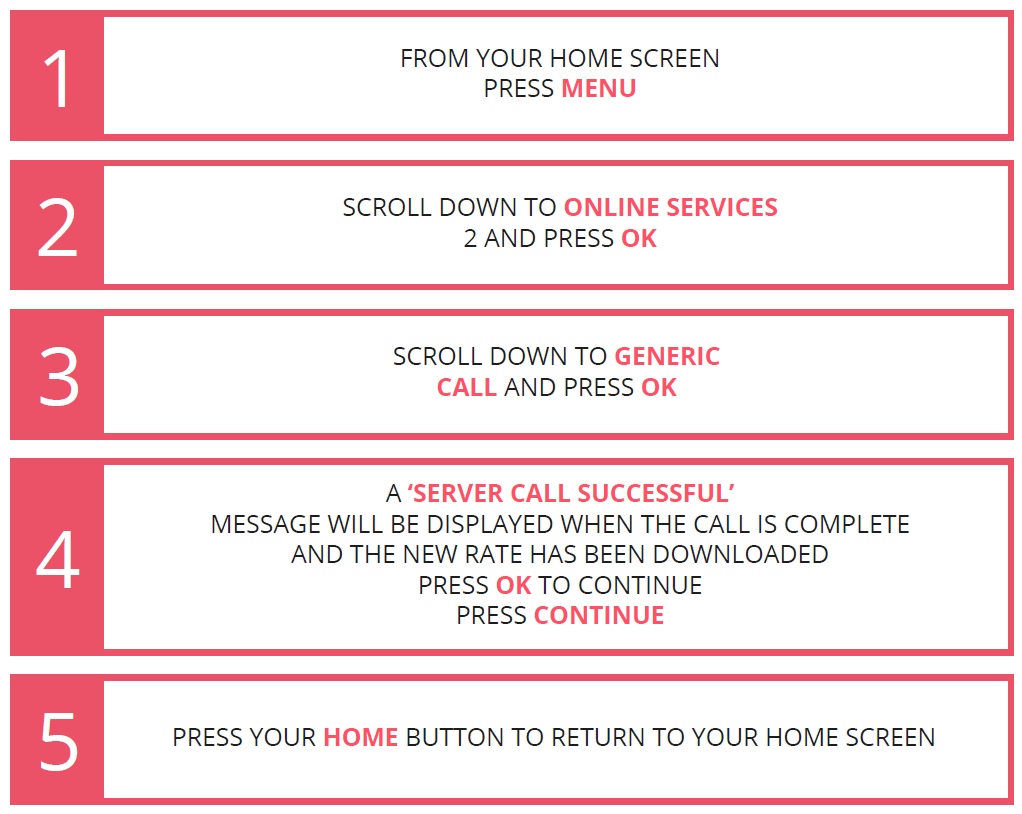
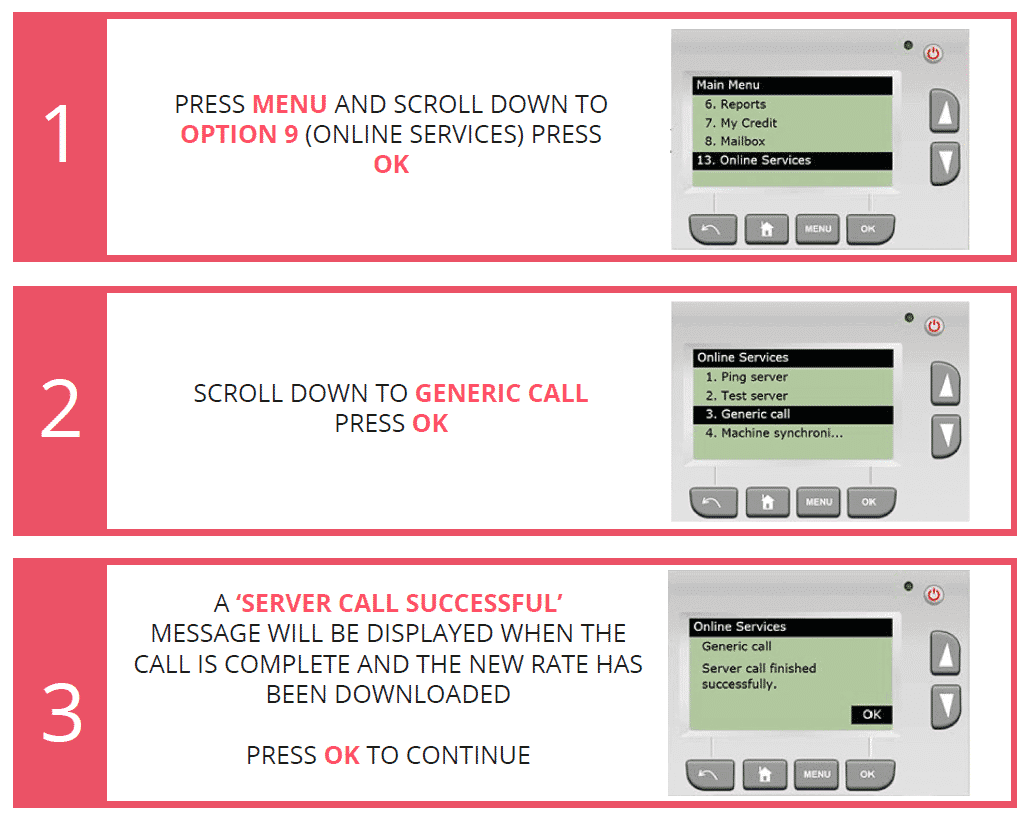
The new rates will be available to download effective from the 23rd March 2026. The new tariffs will be held in the memory and will activate automatically on the 7th April 2026. The terms and conditions of the Royal Mail Franking Scheme require that you keep postal rates up to date on your machine so it is essential that you download the updated rates as soon as possible for your Frama FS Series 3 franking machine. This update is easily performed by following our video and instructions below.
Learn how to update your Frama FS Series 3 franking machines postage rates by watching the video below or by following the simple instructions:
1. Select the “Menu” button.
2. Scroll down using the arrow button until you can see & select “Online Services”.
3. Scroll down until you can see & select “Generic Call”.
4. The franking machine will check for, and download, the latest rates.
5. Once installed, you will see a notification. Click the “OK” button to complete the update.
From the 7th April 2026 the Royal Mail are updating postage rates that will affect your franking machine. The good news for franking machine customers is that you still receive massive discounts using a franking machine versus stamps or smartstamp. Download our 2026 Wall Chart here
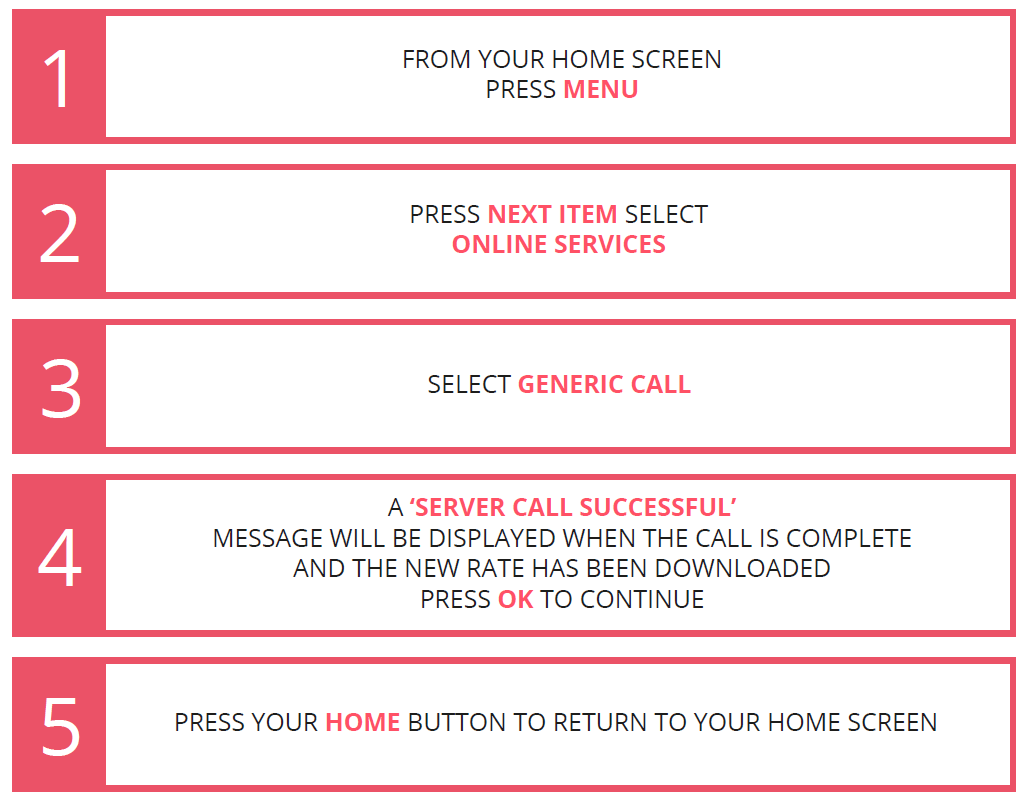
The new rates will be available to download effective from the 23rd March 2026. The new tariffs will be held in the memory and will activate automatically on the 7th April 2026. The terms and conditions of the Royal Mail Franking Scheme require that you keep postal rates up to date on your machine so it is essential that you download the updated rates as soon as possible for your Frama FN Series 5 franking machine. This update is easily performed by following our video and instructions below.
Learn how to update your Frama FN Series 5 franking machines postage rates by watching the video below or by following the simple instructions:
1. Select the “Menu” button.
2. Scroll down using the arrow button until you can see & select “Online Services”.
3. Scroll down until you can see & select “Generic Call”.
4. The franking machine will check for, and download, the latest rates.
5. Once installed, you will see a notification. Click the “OK” button to complete the update.
From the 7th April 2026 the Royal Mail are updating postage rates that will affect your franking machine. The good news for franking machine customers is that you still receive massive discounts using a franking machine versus stamps or smartstamp. Download our 2026 Wall Chart here
The new rates will be available to download effective from the 23rd March 2026. The new tariffs will be held in the memory and will activate automatically on the 7th April 2026. The terms and conditions of the Royal Mail Franking Scheme require that you keep postal rates up to date on your machine so it is essential that you download the updated rates as soon as possible for your Frama FX Series 5 franking machine. This update is easily performed by following our video and instructions below.
Order Low Priced Ink, Labels & Accessorises for your Frama FX Series 5 franking machine – use code NEW10 for 10% off your first order.Learn how to update your Frama FX Series 5 franking machines postage rates by following the simple instructions:
1. Press the postage key. The Rate Selection screen is displayed.
2. Press “8” to select the “Adv. Rate”.
3. Select “Update rate table”.
4. Press “OK”.
5. The mailing system connects to the Online Services server and downloads available rates.
From the 7th April 2026 the Royal Mail are updating postage rates that will affect your franking machine. The good news for franking machine customers is that you still receive massive discounts using a franking machine versus stamps or smartstamp. Download our 2026 Wall Chart here
The new rates will be available to download effective from the 23rd March 2026. The new tariffs will be held in the memory and will activate automatically on the 7th April 2026. The terms and conditions of the Royal Mail Franking Scheme require that you keep postal rates up to date on your machine so it is essential that you download the updated rates as soon as possible for your Frama FX Series 7 franking machine. This update is easily performed by following our video and instructions below.
Learn how to update your Frama FX Series 7 franking machines postage rates by following the simple instructions:
1. As supervisor, from the main menu, select the path: “Options and Updates” and then “Rate management”.
2. The list of rate tables is displayed in the Rate management screen. The tables are identified by the effective date of the rate.
3. Select “Updates?”.
4. The mailing system connects to the Online Services server and downloads available rates.
From the 7th April 2026 the Royal Mail are updating postage rates that will affect your franking machine. The good news for franking machine customers is that you still receive massive discounts using a franking machine versus stamps or smartstamp. Download our 2026 Wall Chart here
The new rates will be available to download effective from the 23rd March 2026. The new tariffs will be held in the memory and will activate automatically on the 7th April 2026. The terms and conditions of the Royal Mail Franking Scheme require that you keep postal rates up to date on your machine so it is essential that you download the updated rates as soon as possible for your Frama FX Series 5 franking machine. This update is easily performed by following our video and instructions below.
Order Low Priced Ink, Labels & Accessorises for your Frama FX Series 7.5 franking machine – use code NEW10 for 10% off your first order.Learn how to update your Frama FX Series 7.5 franking machines postage rates by following the simple instructions:
1. As supervisor, from the main menu, select the path: “Options and Updates” and then “Rate management”.
2. The list of rate tables is displayed in the Rate management screen. The tables are identified by the effective date of the rate.
3. Select “Updates?”.
4. The mailing system connects to the Online Services server and downloads available rates.
From the 7th April 2026 the Royal Mail are updating postage rates that will affect your franking machine. The good news for franking machine customers is that you still receive massive discounts using a franking machine versus stamps or smartstamp. Download our 2026 Wall Chart here
The new rates will be available to download effective from the 23rd March 2026. The new tariffs will be held in the memory and will activate automatically on the 7th April 2026. The terms and conditions of the Royal Mail Franking Scheme require that you keep postal rates up to date on your machine so it is essential that you download the updated rates as soon as possible for your Frama FX Series 9 franking machine. This update is easily performed by following our video and instructions below.
Order Low Priced Ink, Labels & Accessorises for your Frama FX Series 9 franking machine – use code NEW10 for 10% off your first order.Learn how to update your Frama FX Series 9 franking machines postage rates by following the simple instructions:
1. As supervisor, from the main menu, select the path: “Options and Updates” and then “Rate management”.
2. The list of rate tables is displayed in the Rate management screen. The tables are identified by the effective date of the rate.
3. Select “Updates?”.
4. The mailing system connects to the Online Services server and downloads available rates.
From the 7th April 2026 the Royal Mail are updating postage rates that will affect your franking machine. The good news for franking machine customers is that you still receive massive discounts using a franking machine versus stamps or smartstamp. Download our 2026 Wall Chart here
The new rates will be available to download effective from the 23rd March 2026. The new tariffs will be held in the memory and will activate automatically on the 7th April 2026. The terms and conditions of the Royal Mail Franking Scheme require that you keep postal rates up to date on your machine so it is essential that you download the updated rates as soon as possible for your FP Mailing Postbase Mini franking machine. This update is easily performed by following our video and instructions below.
Learn how to update your FP Mailing Postbase Mini franking machines postage rates by watching the video below or by following the simple instructions:
1. Select the “Menu” button.
2. Click the arrow until you can see & select “Remote Services”.
3. The franking machine will check for, and download, the latest rates.
4. Once installed, you will see a notification. Click the green tick button to complete the update.
From the 7th April 2026 the Royal Mail are updating postage rates that will affect your franking machine. The good news for franking machine customers is that you still receive massive discounts using a franking machine versus stamps or smartstamp. Download our 2026 Wall Chart here
The new rates will be available to download effective from the 23rd March 2026. The new tariffs will be held in the memory and will activate automatically on the 7th April 2026. The terms and conditions of the Royal Mail Franking Scheme require that you keep postal rates up to date on your machine so it is essential that you download the updated rates as soon as possible for your FP Mailing Postbase Qi3, Qi4, Qi6, Qi9, Econ, Office, Enterprise & Enterprise Pro franking machine. This update is easily performed by following our video and instructions below.
Learn how to update your FP Mailing Postbase Qi3, Qi4, Qi6, Qi9, Econ, Office, Enterprise & Enterprise Pro franking machines postage rates by watching the video below or by following the simple instructions:
1. Select the “Menu” button.
2. Click the arrow until you can see & select “Remote Services”.
3. The franking machine will check for, and download, the latest rates.
4. Once installed, you will see a notification. Click the green tick button to complete the update.
From the 7th April 2026 the Royal Mail are updating postage rates that will affect your franking machine. The good news for franking machine customers is that you still receive massive discounts using a franking machine versus stamps or smartstamp. Download our 2026 Wall Chart here
The new rates will be available to download effective from the 23rd March 2026. The new tariffs will be held in the memory and will activate automatically on the 7th April 2026. The terms and conditions of the Royal Mail Franking Scheme require that you keep postal rates up to date on your machine so it is essential that you download the updated rates as soon as possible for your FP Mailing Postbase Vision 3S, Vision 5S, Vision 5A, Vision 7A & Vision 9A franking machine. This update is easily performed by following our video and instructions below.
Learn how to update your FP Mailing Postbase Vision 3S, Vision 5S, Vision 5A, Vision 7A & Vision 9A franking machines postage rates by following the simple instructions:
1. Turn the franking machine on to access the “Home” Screen.
2. Press the “Menu” Button and then the “Synchronise” Button.
3. Press the “Remote Services” Button.
Call us on: 01543 572 776